outperform company logo
|
outperform company logo
|
Outperform — Sprint Tools

A Sprinting App Built for Coaches and Athletes

See what your stopwatch can’t.
01
Get the app
Free on ios

Scan to install. 
No paywall, no ads.

Free on iOS. Coming soon to Android.
QR code for outperform sprint tools ios app
01
Get the app
Free on ios

Click to install. 
6 tools, no paywall on any of them.

Free on iOS. Coming soon to Android.
02
Sprint Tools · Inside the App
Outperform Sprint Tools is a sprinting app for coaches and athletes who want to measure what actually drives speed. Six tools in one app: reaction time, central nervous system readiness, stride length and stride frequency, wicket spacing, block start position, and frame-by-frame video analysis. 
Simple enough to use at practice,
Detailed enough to actually help.
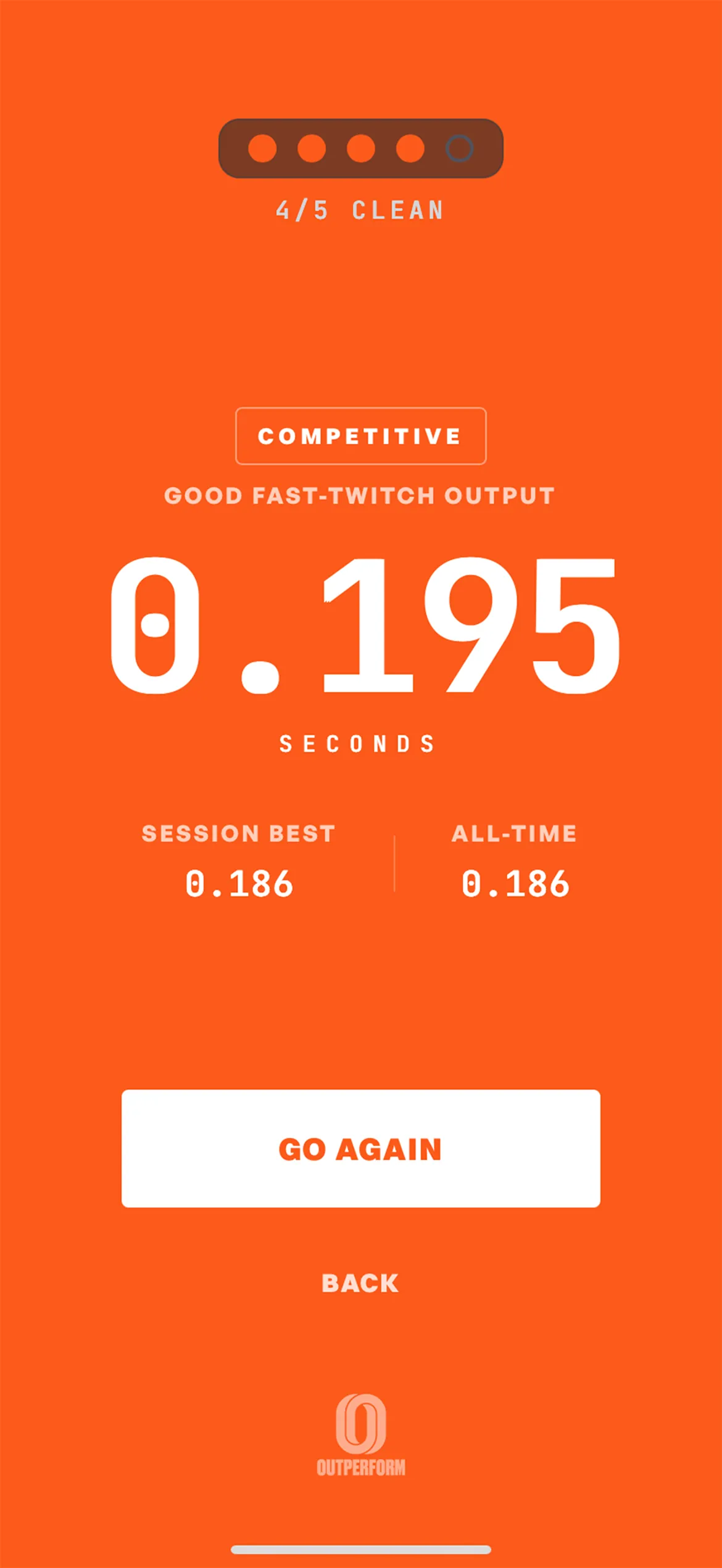
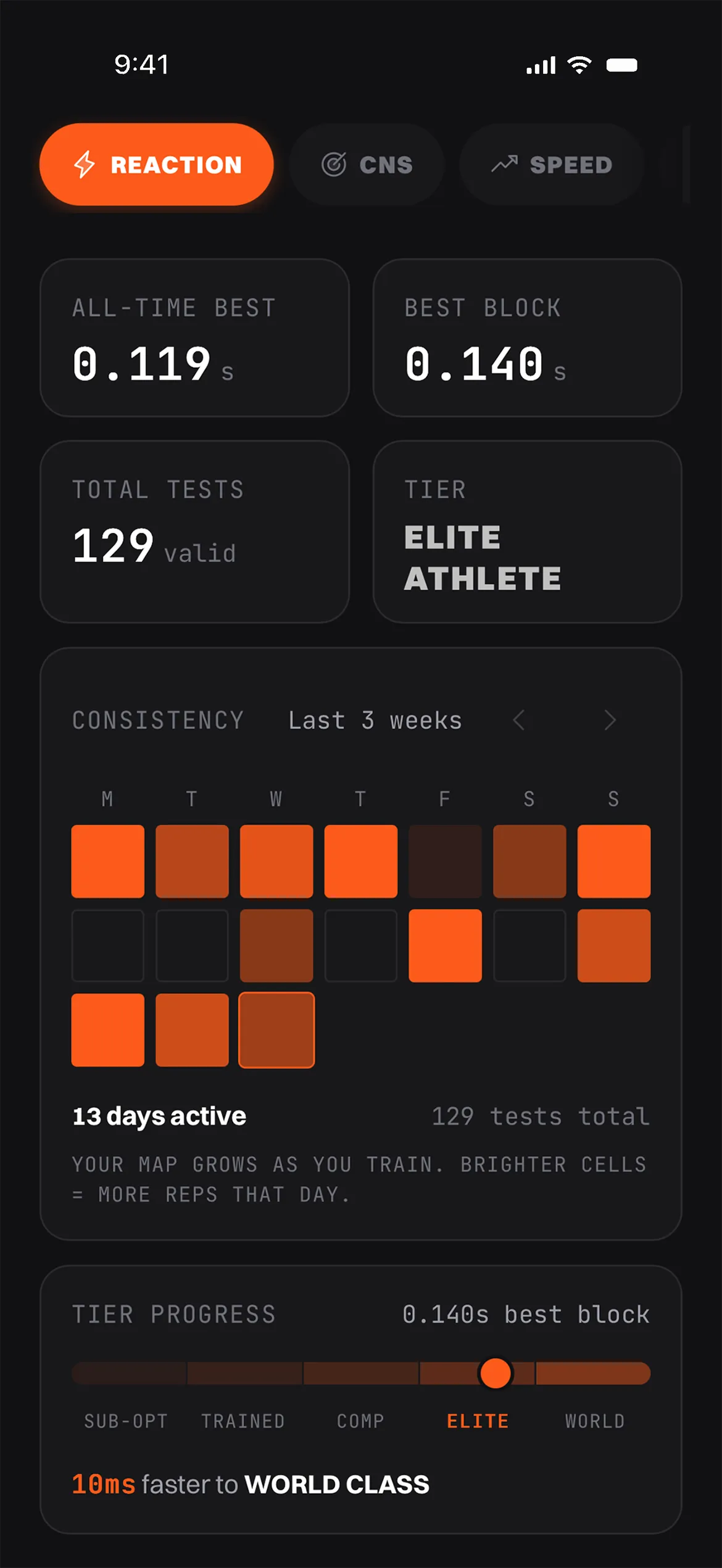
Starting gun reaction time test in the Outperform sprinting app showing 0.119s all-time best and 0.140s best block of five attempts
001
Reaction
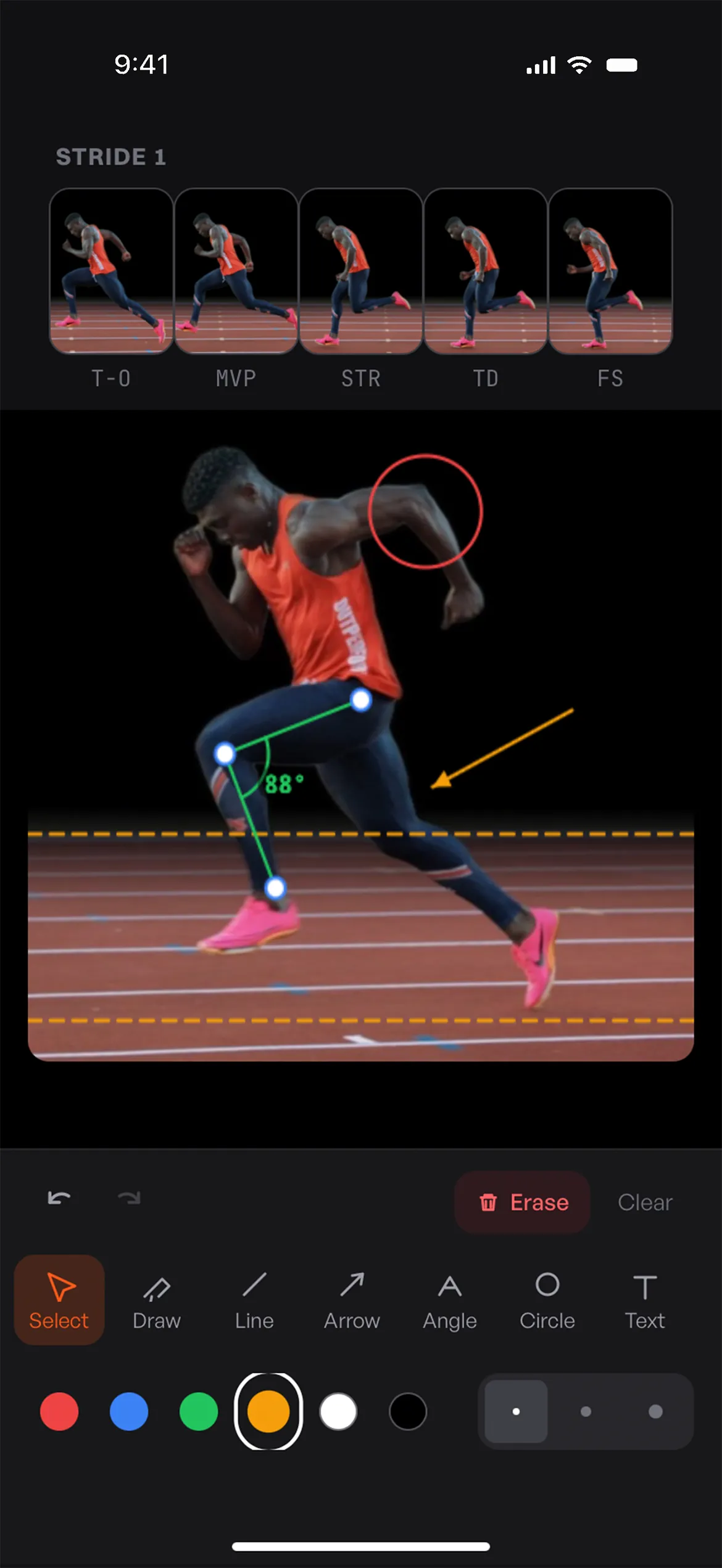
Sprint kinogram builder showing five frames of a stride from toe-off through full support with joint angle annotations
003
Kinogram
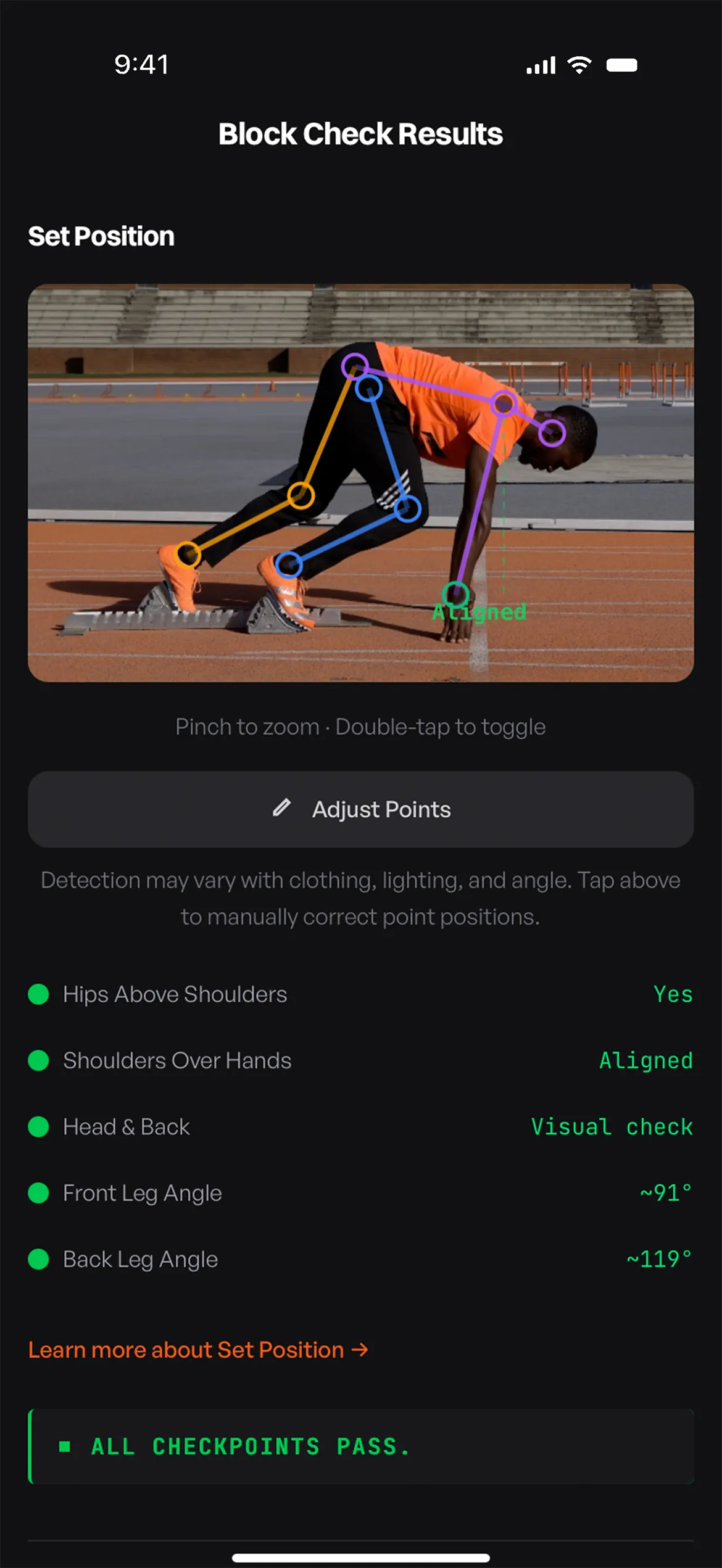
Block start position check using Apple Vision pose detection with traffic-light grading on shin angle, hip projection, and shoulder alignment
006
Block Check
04
001 · Starting Gun Reaction
Tool 1 of 06
001 · Starting Gun Reaction

A tenth at the gun is a tenth on the clock.

One twitch and you are out. Best clean block of 5 wins.
The Starting Gun Reaction test simulates the exact audio sequence of a meet start: on-marks, set, then the gun. The hold between set and the gun varies every rep, just like at a real meet, so you cannot anticipate it. We measure your reaction in milliseconds using the same high-precision timing your phone uses for game input, so the number on screen is the number that would show up on a real timing system. The leaderboard does not rank you on a single lucky attempt, it ranks you on your best clean block of 5: five consecutive reactions in one session with zero false starts. That mirrors what actually happens at a meet: one twitch and you are out.
In Practice
Treat it like a pre-practice neural primer rather than a one-and-done test. A short block before a speed session wakes up the central nervous system and locks in the audio cue you will hear at meets. Use wired headphones or your phone speaker, not Bluetooth. Bluetooth adds 100 to 300 ms of latency, so we block it. Set a baseline early in your training cycle, then chase your personal best across the season. Every clean block of five trains the discipline of staying patient in set, which is where most false starts happen.
Hold
Variable
Latency
<6ms
Block
5/5
Sprinting reaction time test result showing the most recent reaction time, current best, and tier ranking against elite athlete benchmarks
05
002 · CNS Readiness Tracker
Tool 2 of 06
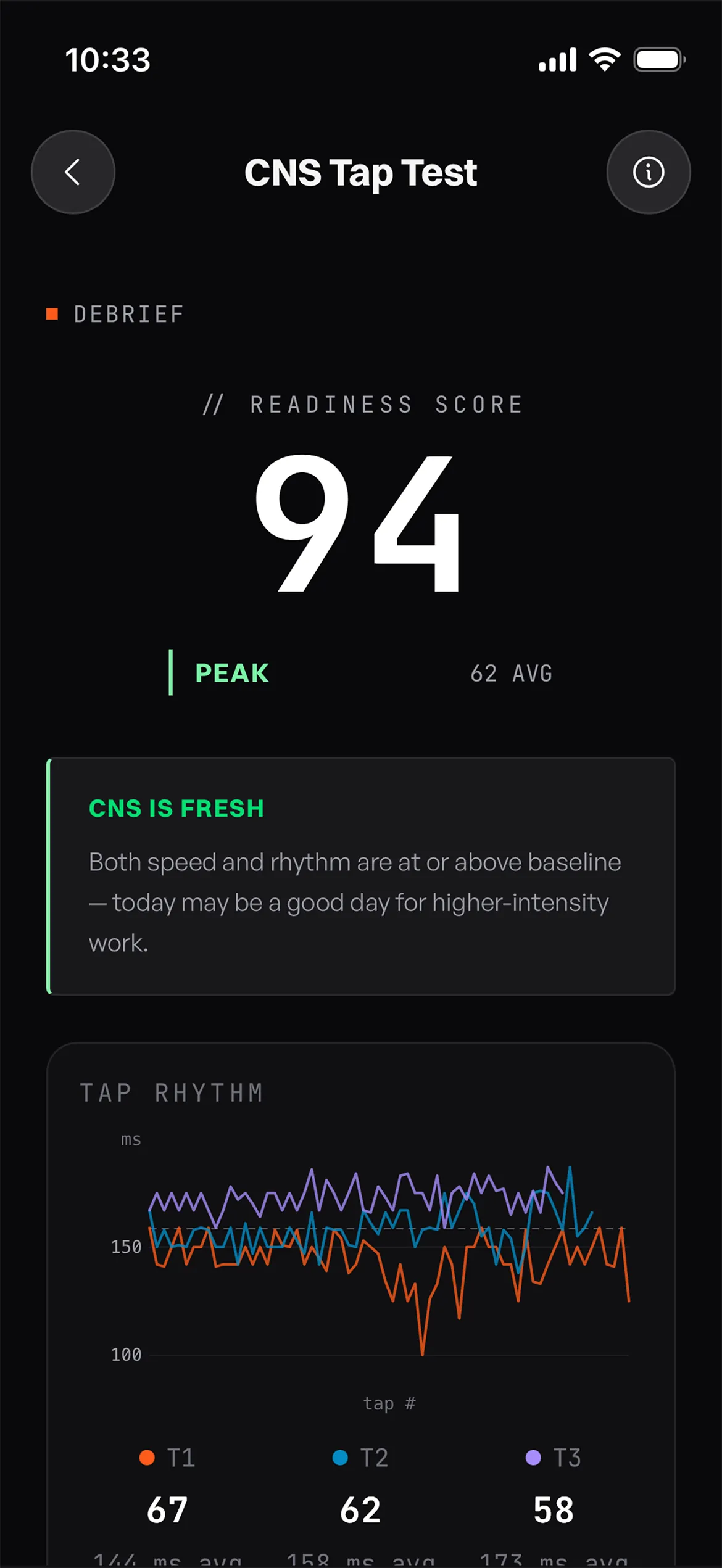
Daily CNS readiness score showing Ready, Maintain, or Recover status based on tap test results and 7-day baseline
002 · CNS Readiness Tracker

Know when to push. Know when to back off.

Catch fatigue before you can feel it.
The CNS Tap Test is a research-backed way to detect central nervous system fatigue before it shows up on the track. You run three 10-second rapid taps between two zones. We measure total taps, taps per second, and rhythm stability across all three rounds, then roll the results into one daily readiness score: Ready, Maintain, or Recover. The first seven days build your personal baseline so the score reflects your nervous system, not a generic benchmark. After calibration, the home screen shows a 7-day rolling chart so you can see whether you are climbing toward a peak or running into accumulated fatigue. A daily reminder keeps the habit consistent.
In Practice
Test at the same time every day, ideally first thing in the morning before caffeine or training. Inconsistent timing pollutes the trend. Watch the direction of the line, not any single day. A one-day dip after a hard session is normal. Three flat or falling days in a row is a real signal to back off intensity. Pair the readout with how you actually feel in warm-up: when the tracker says Recover and your warm-up confirms it, that is the day to swap a max-effort session for tempo work. Used this way, the test becomes the cheapest, fastest auto-regulation tool in your training.
Score
Ready
Calibration
7 days
Test time
30 sec
06
003 · Kinogram Builder
Tool 3 of 06
003 · Kinogram Builder

The 5 positions where every technique issue hides.

Compare your stride to elite models, position by position, and see exactly what to fix.
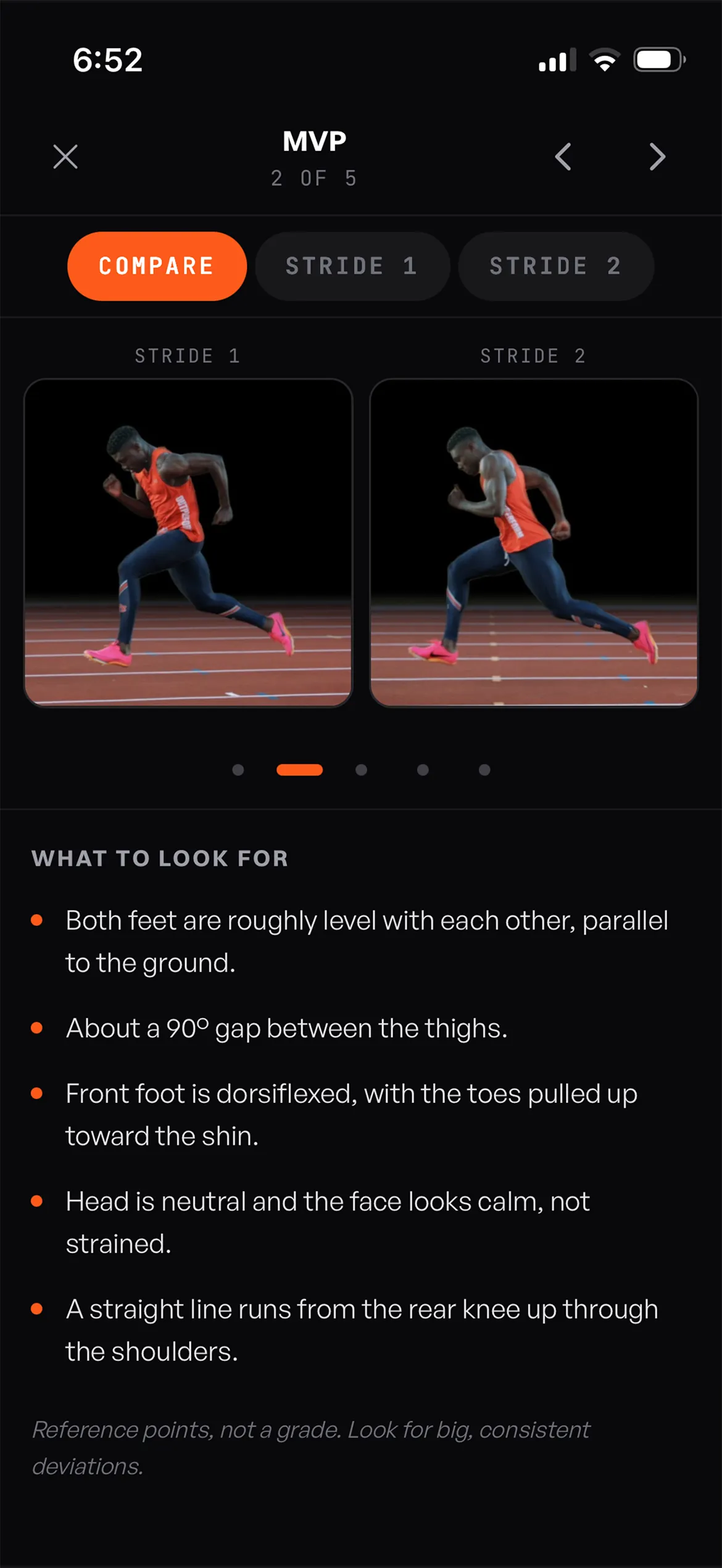
Sprint kinogram position 1 at toe-off showing the moment the trailing leg leaves the ground for analysis of push-off mechanics
01
Toe-off
Sprint kinogram frame 2 at maximum vertical projection showing the highest point of the swing leg cycle for analysis of front-side mechanics
02
Max Projection
Sprint kinogram position 3 at strike showing the lead leg descending toward ground contact for analysis of touchdown preparation
03
Vertical
Sprint kinogram position 4 at touchdown showing initial ground contact for analysis of foot strike position and overstriding
04
Touchdown
Sprint kinogram frame at full support showing the moment the body passes over the support leg for analysis of hip projection and posture
05
Full Support
The Kinogram Builder turns a slow-motion video of one stride into the same 5-position strip elite coaches build by hand in Photoshop or Canva (in about three minutes instead of thirty). It's one of the most-used tools in the Outperform sprinting app for a reason: every max velocity sprinting technique issue hides in one of those five frames. The app walks you through capturing each of the 5 key positions one at a time, with on-screen guidance telling you exactly what to look for at toe-off, max projection, vertical, touchdown, and full support. A built-in annotation layer lets you draw plumb lines, joint angles, and freehand notes directly on the frame. Every kinogram saves to the athlete's profile so a season's worth of work lives in one tidy timeline.
In Practice
The real payoff comes from how you use the saves. Capture both the right and left stride and stack them side by side to spot asymmetries that are invisible at full speed: a collapsed hip on one side, a shorter front-side mechanic, an early touchdown on the weak leg. Re-shoot the same athlete every four to six weeks and slide between kinograms to see whether cues are actually changing positions, not just intentions. For best results, film from a perpendicular side angle at 120 fps or higher (240 fps if your phone supports it) with the athlete filling the frame at the moment of contact. Good capture in, real coaching out.
Frames
5/stride
Capture
240 fps
Build
~3 min
Side-by-side view of different strides in the kinogram builder.
07
004 · Wickets Calculator
Tool 4 of 06
004 · Wickets Calculator

Wickets that fit the athlete, not the chart.

A complete max-velocity setup in seconds.
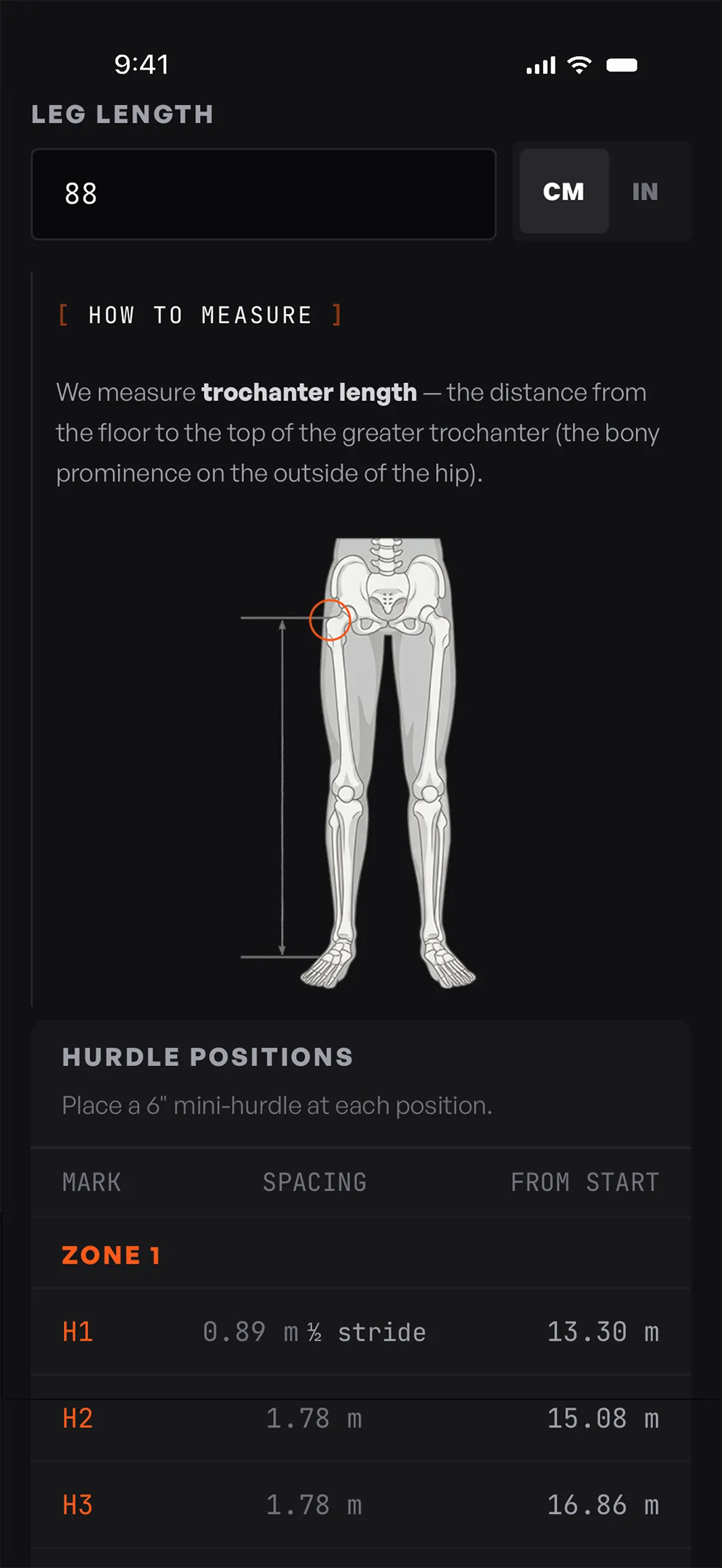
The Wickets Calculator builds a complete max-velocity wicket-run setup in seconds: run-in marks, hurdle positions, and cumulative distances, all on your phone and ready to lay out at the track. Two modes cover every athlete you coach. Quick Setup uses the proven Anderson-style profile: pick the athlete category and tier, and the spacing snaps in instantly. Custom Setup drives spacing from the athlete's actual leg length and a seasonal progression formula, so tall, short, or developing athletes get a setup that fits them rather than a population average.
In Practice
Custom setups are the ideal. Once you have an athlete's leg length on file, the calculator dials in spacing matched to their actual stride mechanics rather than a population average. That gap matters most for your tall and short athletes, and for developing sprinters whose stride is changing every few months. Use Quick Setup for group sessions where five athletes of similar level can all run the same wickets back to back, or as a starting point before you take measurements. Save each setup to the athlete's profile so when they show up next Tuesday you are not measuring out a brand new run. As max velocity climbs across the season, update the inputs and watch the spacing stretch with them. A wicket setup that no longer challenges an athlete is just a sprint with extra hurdles in the way; the calculator makes it easy to keep the stimulus matched to the work they are actually capable of today.
Fit
Per 
athlete    
Modes
Quick + Custom
Output
Lane diagram
Wickets spacing calculator showing custom hurdle positions calculated from athlete leg length and max velocity tier
08
005 · Speed Profile
Tool 5 of 06
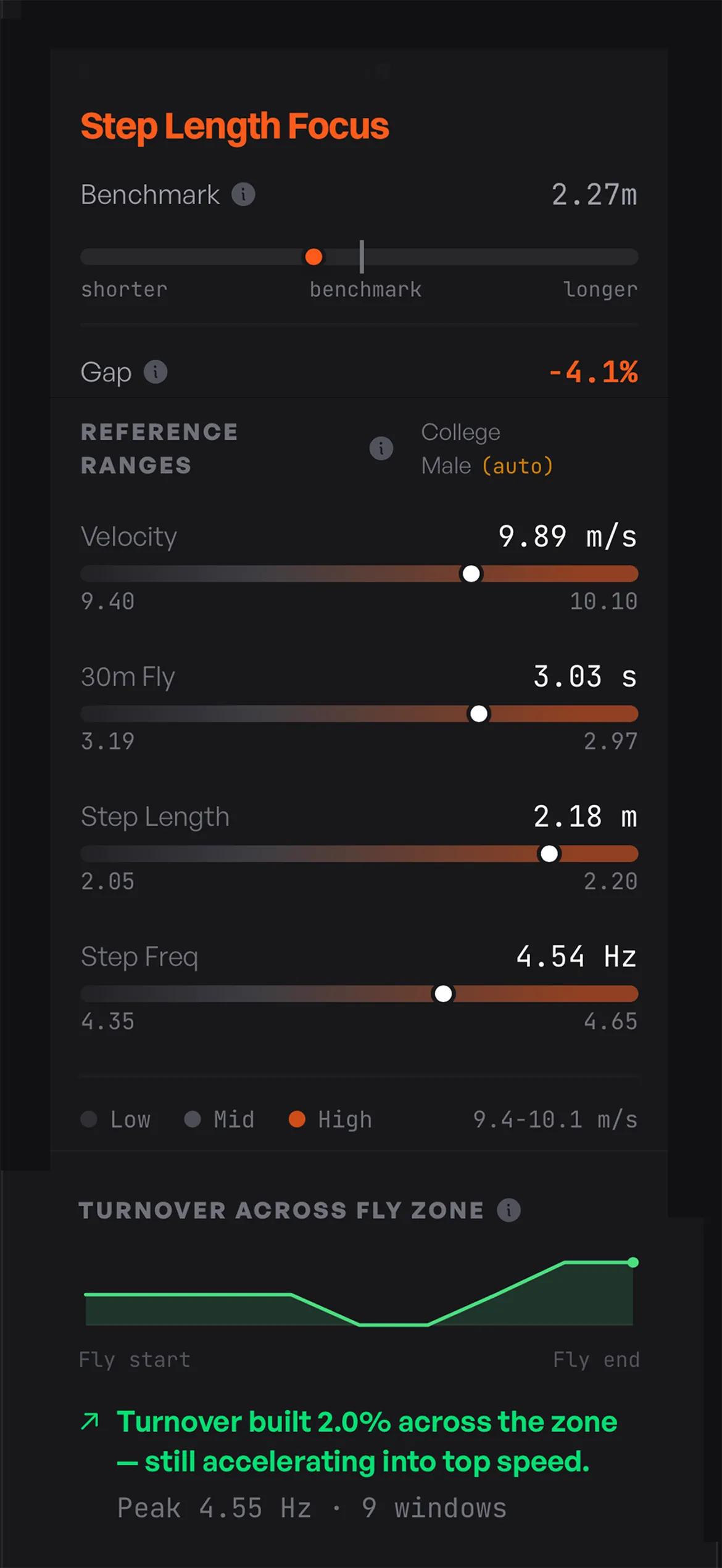
30m fly speed profile showing velocity, stride length, and stride frequency benchmarked against high school, college, and pro track athletes
005 · Speed Profile

Stride length, stride frequency, or both?

A 30m fly becomes velocity, step length, and step frequency, benchmarked against athletes at the same level.
The Speed Profile breaks a 30m fly into the three numbers that actually drive sprint speed: velocity, step length, and step frequency. Plug in the athlete's leg length, capture step timestamps from the clip, and the app returns each metric alongside benchmarks for athletes at the same level (high school, college, elite). Where most tools stop at a finish-line number, Speed Profile shows you which component of speed is doing the work and which is lagging. An athlete with long strides but below-benchmark frequency has a clear training direction. So does the opposite. Length or frequency, the answer is different for every athlete, and now you have it.
In Practice
Run a profile early in the season to set the baseline, then re-run after each training block to see what is actually moving. If the benchmark says the athlete should be hitting 2.20 m steps and they are at 2.05 m, length work has clear runway. If frequency is the lagging metric, switch the emphasis. Save each profile so you can scroll back through a season and see the curve, not just the latest snapshot. Pair the inputs with the Kinogram for the same clip and you get the rare combination of qualitative position work and quantitative output sitting next to each other for the same stride.
Input
30m fly
METRICS
Length + frequency
BENCHMARKS
HS/College
/Pro
09
006 · Block Check
Tool 6 of 06
006 · Block Check

The two frames that decide your start.

Set position and block clearance, graded by Apple's Vision framework on the angles that actually matter
Block Check grades a sprinter's start from the two frames that actually matter: set position and block clearance. Film the athlete from the side in slow motion, then import the clip and scrub to the frames you want graded. A still photo works for set, but block clearance is hard to catch by hand, which is why the slow-motion clip is the better workflow for both. Tap two points to calibrate the ground line, and the app uses Apple's Vision framework to overlay pose landmarks and traffic-light grades on the segments that actually drive a fast start: back leg angle, front shin angle, hip projection, and shoulder stack at set, plus extension and projection angles at clearance. Green, yellow, and red show at a glance which checkpoints are dialed in and which need a cue. Every check saves to the athlete's profile alongside the annotated frame, so you have a record, not a guess.
In Practice
Shoot from a perpendicular side angle with the camera level and roughly at hip height. Tilted phones throw off angle measurements, and slow motion (240 fps on most modern phones) gives you the frame precision block clearance demands. Glance over the auto-detected landmarks before saving. The pose layer is good, but a hand-confirmation on knee or hip points takes two seconds and locks in the result. The most powerful workflow is before-and-after: capture the set, give one cue ("more aggressive front-shin angle"), capture again, and save both. The athlete sees the change in their own body in under thirty seconds, which beats a thousand verbal corrections. Over a season, the saved sequence becomes a visible trail of improvement you can show a parent, a college coach, or the athlete on a tough day.
Frames
Set + clearance
Grading
Traffic-light
Tech
Apple Vision
Block start position check using Apple Vision pose detection with traffic-light grading on shin angle, hip projection, and shoulder alignment
10
Get the App
iOS 17+ · Android signup
10 / Get the app

6 tools. No paywall, no ads.

Free on iOS. Coming soon to Android.
QR code for outperform sprint tools ios app
10
Get the App
iOS 17+ · Android signup
10 / Get the app

6 tools. No paywall, no ads.

Free on iOS. Coming soon to Android.
2025 - Copyright Outperform, All Rights Reserved
crossmenu
linkedin facebook pinterest youtube rss twitter instagram facebook-blank rss-blank linkedin-blank pinterest youtube twitter instagram